2024-March-26: This widget has been updated to 2.2.1. Please refer to the following changelog. Download Accessibility Widget from WordPress.org Plugins Directory.
To see this plugin in action, visit my Demo site and scroll to the bottom of the site.
Changelog
= 2.2.1 =
- Sanitized data before inserting into widget settings to avoid XSS exploit.
- Changed “Changelog has been moved here” to “Changelog has been moved to the Plugin Homepage”.
- Added
blueprint.jsonto make this compatible with WordPress Playground.
= 2.2 =
- Added gettext for i18n / l10n.
- Simplified labels in widget settings.
- Moved Changelog information out of README and in to this post.
= 2.1 =
- Updated widget to remove deprecated functions.
= 2 =
- Added a new function to display tooltip on mouse hover (HTML title tag).
- Modified default settings for font sizes and controllers.
= 1.2.1 =
- Debugged controller text to allow a single character/word or multiple character/word (but multiple characters MUST match the amount of font-size used).
= 1.2 =
- Added option to customise controller text, i.e. the words you click on to change the text size.
= 1.1.1 =
- Added HTML tags p, li and td options by default for first-time installation.
= 1.1 =
- Added options into the widget form for easy customisation.
= 1.0 =
- First release.
(Updated 18-Nov-2016) The Accessibility Widget is now updated to version 2. This major update includes a new function: tooltip. I simply added an HTML title tag so that a description appears when you move your mouse over a text controller (say, the word, “LARGE”). However, this update WILL break your plugin, so please make sure to go to your Widgets settings and do the necessary changes before clicking the Save button.
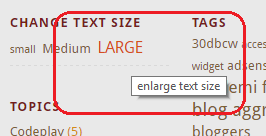
Thanks to user h555 at the WP.org support forum for suggesting this feature.
(Updated 20-Dec-2015) Yikes, everyone! If you have any request for help, please post them in the WordPress.org Support Forum instead of using the Feedback form in this site. Not only will I check that forum often, but it’ll also help other users who are having the same issues as you, and won’t have to ask the same question over and over again. Thank you 🙂 For some reason, my feedbacks aren’t sending out e-mails to me, hence the non-response.
The Accessibility Widget is now available at WordPress.org Plugins Directory. Go there to download, or just go to your WordPress dashboard Plugins / Add New, and search for Accessibility Widget to install.
After I install, how do I customise the Accessibility Widget?
2024-March-14: Please refer to the widget’s Plugin Directory page at WP.org for the latest instructions.
As of version 1.2, you can set HTML or CSS tags that you want to resize, the font sizes you want to use, and the controller text that users click to change the font size.
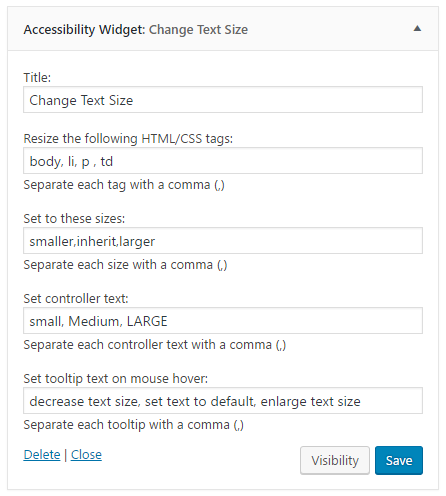
Resize the following HTML/CSS tags
Specify all the HTML or CSS tags you want to resize in this section. By default, the HTML tag body, p, li and td are set.
Different WordPress theme may have different and unique stylesheet classes and IDs. You can switch on your browser’s built-in Developer Tools and use the Inspect Element option to detect what HTML/CSS codes to use.
Set to these sizes
This is where you set the font-size you want to enable for the users to use (read up on the CSS font-size property at W3Schools). The simplest font-size group you can use are smaller, inherit, larger.
Set controller text:
By default, the widget displays the letter “T” depending on the number of font sizes you use; that is, if you set only two font-size, then only two letter T appears, and so forth. Starting with version 1.2, you can set it to use more meaningful words, like Small, Normal, Large for each size you specify.
Set tooltip text on mouse hover:
Write descriptive info here as tooltips, which appear when you move your mouse over a text controller. Each tooltip corresponds to the respective controller text as arranges in the “Set controller text” section. By default, the tooltip texts read as “90%”, “100%”, “110%”, and “120%”.
Go to the Plugins forum for support.
Wishlist / Future features
(updated 02-Dec-2013)
- Display images instead of text on the widget.
- Website colour contrast control.
- Stop the controller text from being resized.
(updated 12-Mar-2007)
Download WordPress Accessibility Widget v.0.9 (download link disabled; please read note above)
(the ramblings below was the original content of this post)
YES! Oh yeah, oh yeah.
I did say I would make my own widget if I couldn’t find it, and here it is, the long-lost Accessibility Widget originally written by Tane of Digital Spaghetti and revived by yours truly. I’ve been getting hits from people who are looking for this widget since I posted my desire to get one on my site. I’m currently waiting for Tane to respond to my request. There must be a reason why he stopped sharing it in the first place, so till then, I’ll hold on to the download link until he gives me an OK sign.
In the meantime, take a look at the top of my sidebar and get crazy. It’s decent, but I tell you, it’s not 100% perfect. I certainly do not have the original codes that Tane developed and I’m sure he did more customization on it that I’ve yet to know of. It’s fun, though. When I’m done with properly widgetizing the Top Commentators plugin, I’ll move on to improving this one.
(Update 12-Mar-07) The widget is now available for download, since I’ve received several e-mail requests for it. No customization can be done with it as of yet, but I’ll start to tinker it next month when I’m done with the Top Commentators Widget. I plan to match all the things that can be done with the previous Accessibility Widget, with the original Readme file as my reference.
Sorry, Tane, but I can’t wait for your reply, but thanks again for creating this widget.
Check out my other posts: « Blogosphere is dangerous for my babies / To all you Daniel Radcliffe “fans” »
And ??? are you going to share it ?
Tane hasn’t gotten back to me yet, Robbert. But I will share it out pretty in a week’s time if there’s still no news.
thanks for reviving this great widget. I installed it in a test site
http://kitkaplan.com/onespirit/
but the only thing that gets bigger in my theme is the links. Is this because of the theme specs? Got any idea how to adjust?
Wow. I’ve checked out your test site, Kit. Based on my limited knowledge of CSS there’s nothing wrong with your stylesheets other than the fact that your styles do not have any font-size settings for default HTML tags, i.e. body, a, li, p, td … etc. Most if not all of the font-size settings were within class selectors (.small h1) or ID selectors (eg. #credits).
Honestly, adding font-size setting may or may not help, but there’s no harm in trying. I just wished I know more about CSS to solve your problem. Let me know how it goes.
I love the WordPress Accessibility Widget v.0.9 , just what I was looking for. However It is resizing all the text on the page rather than just the text in the posts. Is there anyway I can change this so it only changes the posts? Thanks so much for yur help!
Great plugin – thanks so much 🙂
This is amazing plugin. I use this in my web site.
You do? I’m not seeing it though.