I use Google Reader to read my blog subscriptions, and while it’s not something to really brag about, I’m glad of the fact that arranging them in those order helps me to prioritize which feed I’d end up reading first. If I’m really short of time, my mouse pointer would almost automatically mark all my feeds under Glance Over and Informative (but not critical) as read (yeah, my mouse magically does that sometimes ;P).
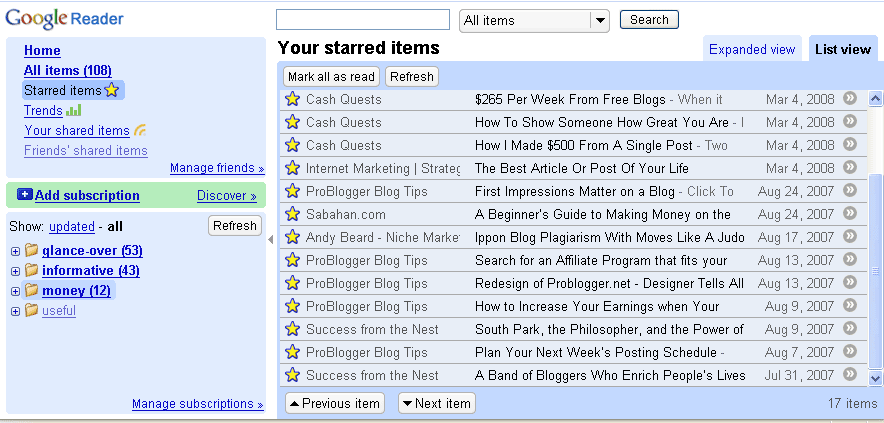
Clearly, my Money and Useful sections are pretty important to me! A total of less than ten sites graced the two sections, while the other 60+ feeds hangs around the other two non-critical sections of my reader. I mark my favourite posts with the star option, and since early last year I have starred less than 20 articles, which goes to show how picky I am when it comes to reading posts.
I’m sure you have your own way of organizing your feed subscription. How do you do it?
Check out my other posts: « My favourite way to surf Entrecard sites / I’m still here… »
Unfortunately there is no method to the madness. I’m going to set aside some time to get it all organized.
Oh, definitely need to get mine organized! I now have 1000+ unread items… 😛
Will take your cue and organize mine too.
I use a two prong approach. I generally subscribe using Google Reader and use it to see if I like the articles from there. If I decide I like the blog, then I switch over to Bloglines and use that.
In Bloglines, I also organize my feeds into folders by topic. It is crazy how many posts there are out there to read. But it definitely pays to organize feeds when you want to do some research for your posts.
Internesting.. I have always rss links on IGoogle. I will check this out.
Thanks.
WOW! Your amazing,thats is such a great idea. I was wondering how on Earth to manage keeping loyal and dropping into blogs. That is AWESOME. Now I just have to make time to go back and add them into my Google read feeder.
Awesome Post Lady,
Thanks
xoxo
I have rss links on IGoogle, too.
I never have time to even organize mine in a way like that. I’m a mess apparently, but this is a great idea.
Thanks!
definitely need to get mine organized! I now have 1000+ unread items
The biggest problem I have found with both feeds and emails (I sign-up to a lot of lists) isn’t so much the organization as it is the time to read it all.
If I am sick one day, or just get busy at work/home I get behind by about 40 items. That just starts a domino effect that spirals out of control. I currently have over 100+ items unread – OMG.
I agree, I can complement googlemail for being so organized compared to other mailers.
Internesting.. I have always rss links on IGoogle. I will check this out.
thnx:)
This is totally off topic…but did you know that there’s a Sabahan Bloggers Gathering in August?
Details are here:
http://www.facebook.com/event.php?eid=11106859543
🙂 Hope to see you there! Please help spread the word around. Thanks!
Yes, I need to get my act together too. This seems to be a good way to go about it. Thank you.
Hey Webgrrrl I hope all is well and you are enjoying your break,
Just wanted to thank you once again for your helpful post which have been nothing but helpful within just one month and a half of entering this blog World.
A million thank you’s looking forward to reading your future blogs.
Sending you a warm embrace,
julissa
PS Google reader is “Da Bomb” I love it Grrrl!!1
Yes 🙂 My feed reader has a lot of categories
easy sollution: don’t use feed readers. Yea, old fashion, but I started working with the Web in 1996. Readers just present too much info overload for me.
Been over a month since you posted webgrrrl! All well with you?
I have a lot of sites in my reader…I need to organize them in some way to make it easier on myself. I love google reader!
Is my feed reader as organized as yours? Absolutely not. It’s a gigantic mess, but I guess it never occurred to me to organize it 🙂
I have Google Reader. A few days and feeds later I have a jumbled mess of an account. I no longer am inclined to check them. I need to follow your advice.
John
Long time no see……………Hello…….Knock knock
I am proud to say yes:) Ive using same software as you do.
Yes! I couldn’t live without Google Reader and it’s categories. I can read what I want when I’m in a certain mood. It’s great!
I use and looooooove Wizz RSS. It’s a firefox plugin that lets you organize your feeds in categories. You can also preview the content and images and can select to see the entire webpage. I suggest you try it and see what you think. I dont have to sign on to anything, all i need is my Firefox. Cheers ~ CJ
lol sure not 😛
thanks =]